
Version 1.0.1 Patch Notes
Thank you for playing Aeclis!
Version 1.0.1 started rolling out at around 12:00 JST on Thursday 15 October.
Here are the features we added and changed in version 1.0.1, along with the bugs we fixed.
Highlights
- Unlock Requirements for High-Level Charts: Lv10 and higher charts are now playable once you clear any one Lv5 or higher chart.
- Judgment Areas: The default boundary between the upper and lower lanes has been lowered, and there are no longer any areas along the top and bottom edges of the screen where taps aren't judged.
- Settings: Added four new settings and changed the default pause behaviour.
- Display: The results screen now shows your FAST/SLOW counts, and tapping the score during play shows your current accuracy (ACC).
- Bug Fixes: Fixed gauge judgment issues and other bugs.
Unlock Requirements for High-Level Charts
Lv10 and higher charts are now playable once you clear any one Lv5 or higher chart. Locked charts show the level you need to clear.
- Lv10 and higher charts: Clear a Lv5 or higher chart (new)
- Lv15 and higher charts: Clear a Lv12 or higher chart (unchanged)
- Lv19 and higher charts: Clear a Lv15 or higher chart (unchanged)
If you haven't cleared any Lv5 or higher chart yet, Lv10–14 charts are also locked. Your existing scores and Rating will be kept.
Judgment Areas
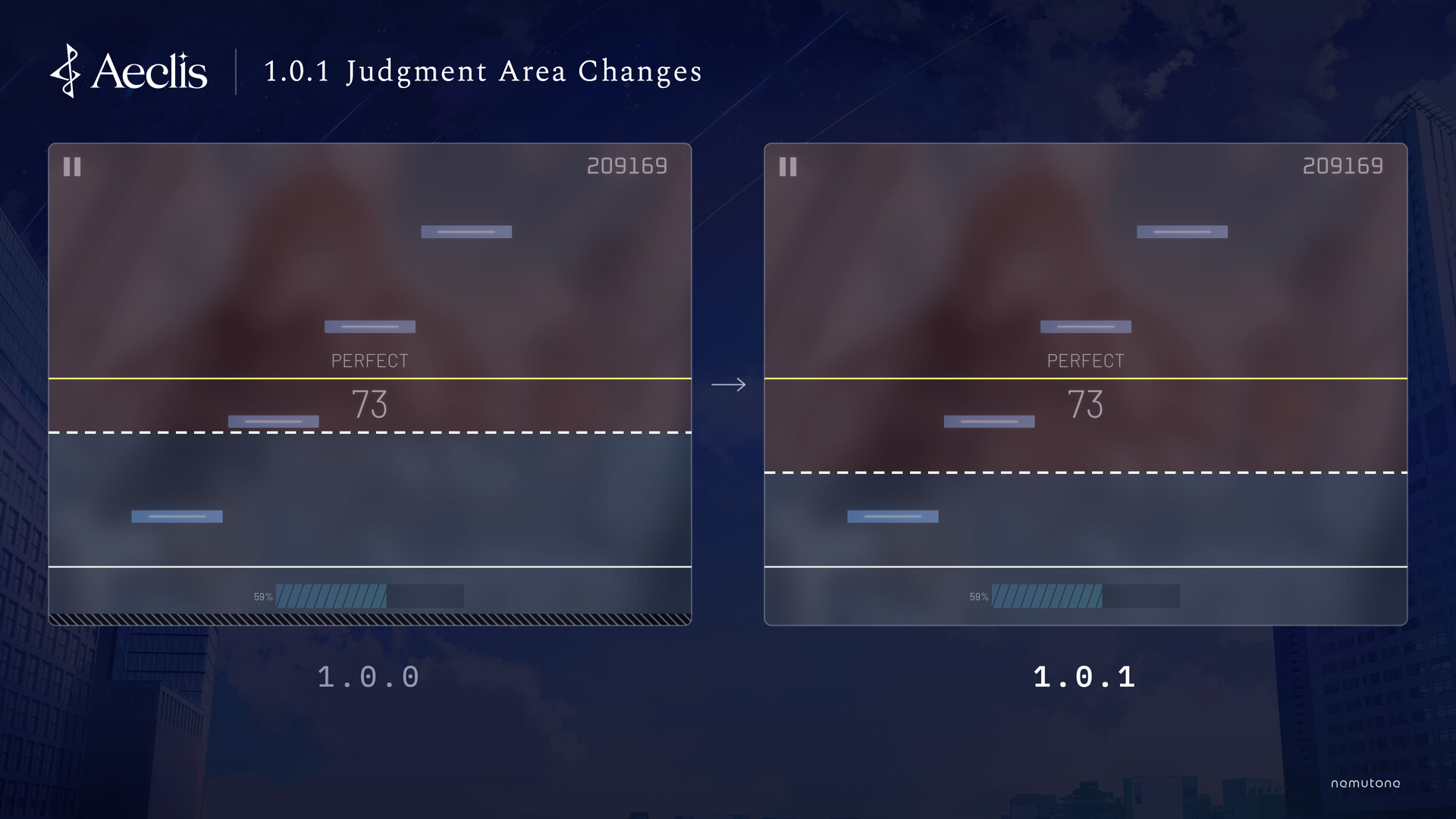
You can find the reasons for these changes here:
Boundary Between the Upper and Lower Lanes
- Default: 40% → 30% of the way up from the bottom of the screen (exactly halfway between the lower and upper judgment lines)
Upper notes hit slightly below their judgment line are now more likely to count as upper notes. You can adjust the boundary with the "Upper/Lower Boundary" setting.
Top and Bottom Edges of the Screen
There are no longer any areas along the top and bottom edges of the screen where taps aren't judged. Lower notes register even when you tap them at the very bottom of the screen. To choose whether touches on the left and right edges are used for judgment, use the "Ignore Touches at Side Edges" setting.
Settings
New Settings
- "Set Upper and Lower Separately": Set Speed, Judgment Offset, and Display Offset separately for the upper and lower lanes.
- "Flick Distance": Choose how much finger movement it takes to register a flick: "Short", "Medium", or "Long". The default, "Short", judges flicks the same way as before.
- "Double-Tap to Pause": The game pauses only when you tap the pause button twice in a row.
- "Ignore Touches at Side Edges": Choose whether touches on the left and right edges of the screen are used for judgment. It's on by default, so touches on the left and right edges still aren't judged, as before.
Default Setting Changes
By default, the game now pauses only when you tap the pause button twice in a row. To pause with a single tap, turn off "Double-Tap to Pause" in the settings.
Display
- The results screen now shows your FAST/SLOW counts.
- Tapping the score during play now shows your current accuracy (ACC). Tap it again to hide it.
- Adjusted the pause menu UI.
- Adjusted the text colour in the rating breakdown on your profile.
Bug Fixes
Gauge Judgment
- Fixed an issue where the NORMAL gauge could end in FAILED even when it finished at exactly 70%.
- Fixed an issue where play could continue on the HARD or EX-HARD gauge even after the gauge reached exactly 0%.
- Fixed an issue where the gauge percentage shown during play could disagree with the clear or FAILED result.
- Fixed an issue with the HARD and EX-HARD gauges where running out of gauge on the last note could make the results screen load again, or make a quick retry jump to a clear result partway through the next play.
Scores and clear results recorded before the update won't change.
Other Fixes
- Fixed an issue where song downloads could stall on slow connections, leaving some songs unplayable.
- Fixed an issue where songs added while the app was running sometimes couldn't be played.
- Fixed an issue where the Rating on the results screen could differ from the one on the song select screen.
- Fixed an issue where tapping a distant song on the song select screen could show another song's high scores.
- Fixed an issue where songs from a purchased song pack could still appear locked.
- Fixed an issue on Android where the share button on the results screen didn't work.
- Fixed an issue on some Android devices where the game could get stuck on the title screen.
- Fixed several other issues.
The issues we found in version 1.0.0 are covered here:
To report a bug or ask a question, please email us at the address listed on our Contact page (contact@aeclis.com).
Upcoming Songs
Two new songs are coming to Aeclis soon. Both will be free to play.
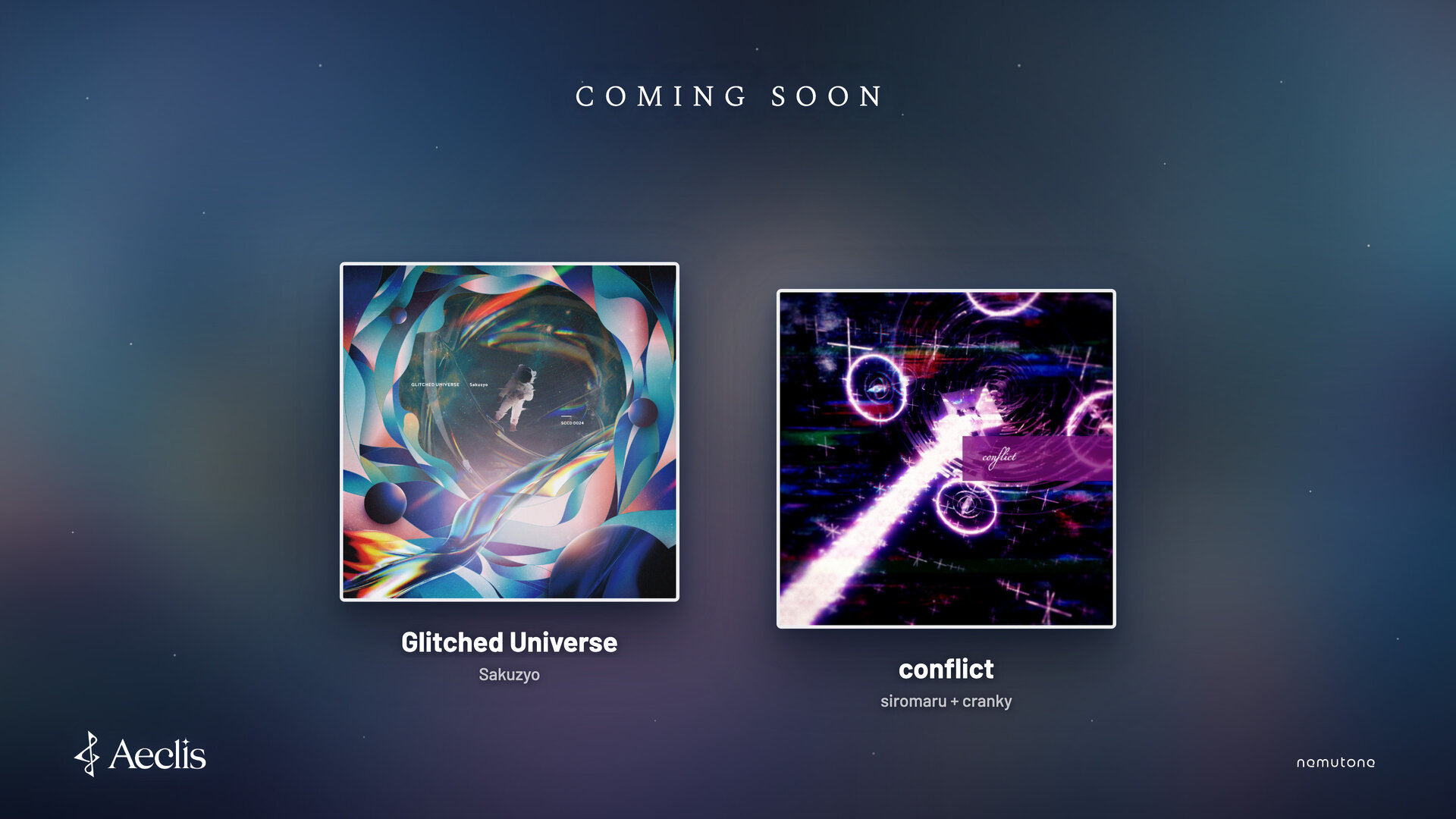
- Glitched Universe / Sakuzyo
- conflict / siromaru + cranky
These songs will be added separately from the version 1.0.1 release. We'll announce the release date as soon as it's set.
We read your feedback. Please keep sharing your thoughts and requests on X with the hashtag #Aeclis!
Thank you for your continued support of Aeclis!