
Features and Changes Planned for Version 1.0.1
[Updated 15 October] We released version 1.0.1 on Thursday 15 October. You can find the full update details here:
[Updated October 12] We've added more planned features, along with information on changes to the judgment areas.
Thank you for playing Aeclis!
In the next update (version 1.0.1), we're planning to add features like these:
- Adjusting the boundary between the upper and lower judgment areas
- Separate note speed, judgment offset, and display offset settings for the upper and lower lanes
- A setting to pause only when you tap the pause button twice in a row
- Tapping the score during play to show your current accuracy (ACC)
- FAST/SLOW counts on the results screen
We also plan to change the judgment areas used when you tap notes, as follows.
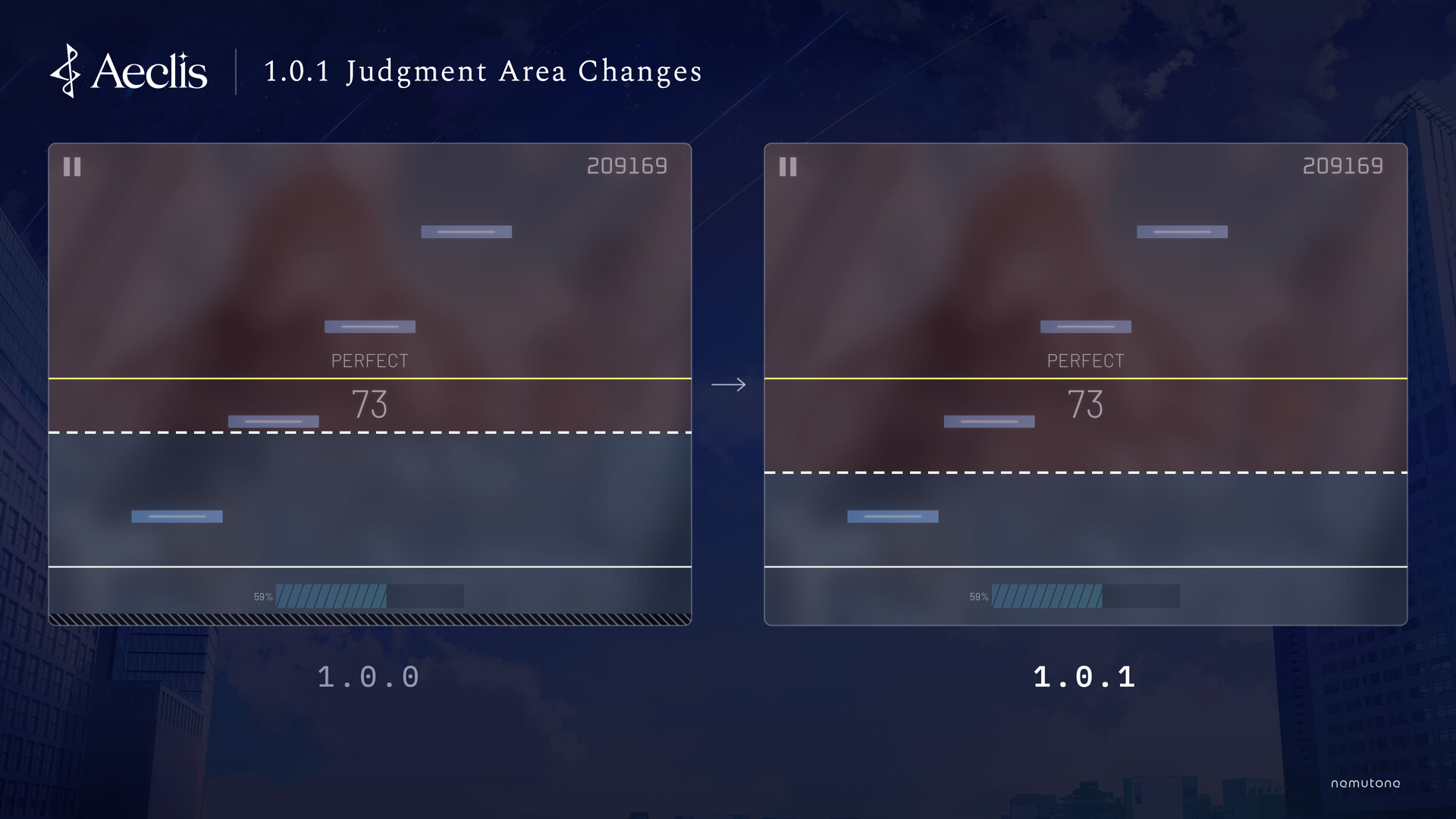
Lowering the Default Boundary Between the Upper and Lower Lanes
When you tap the screen, whether the tap counts for the upper or the lower lane is decided by a boundary 40% of the way up from the bottom of the screen. In version 1.0.1, we'll lower the default boundary to 30% (exactly halfway between the lower and upper judgment lines).
Until now, tapping an upper note slightly below its judgment line could be treated as a lower-lane tap, so the upper note wasn't judged. Lowering the boundary will make this much less likely.
You'll be able to adjust the boundary with the new "Upper/Lower Boundary" option on the settings screen.
No More Unresponsive Area at the Bottom of the Screen
On some devices, such as iPhones and iPads without a Home button, taps on the thin strips along the edges of the screen (around the notch and the home indicator) weren't used for judgment. This was to prevent false judgments when the base of your fingers touches the edge of the screen while you hold the device with both hands.
We've since found that the base of your fingers mostly touches the left and right edges, and that ignoring taps on those edges alone is enough. Meanwhile, along the bottom edge, even taps on lower notes at the very bottom of the screen weren't judged, which made it seem like notes didn't respond to taps.
So in version 1.0.1, only the left and right edges of the screen will ignore taps. Taps anywhere along the bottom edge will be judged, so lower notes will register even when you tap them at the very bottom of the screen.
Version 1.0.1 also adds an "Ignore Touches at Side Edges" option to the settings screen. Turn it off to have taps on the left and right edges judged as well.
Bug Fixes
We're also planning fixes for the issues we've found in version 1.0.0. You can find the list of known issues here:
We'll share the timing once it's decided.
We read your feedback. Please keep sharing your thoughts and requests on X with the hashtag #Aeclis!
To report a bug or ask a question, please email us at the address listed on our Contact page (contact@aeclis.com).
Thank you for your continued support of Aeclis!